
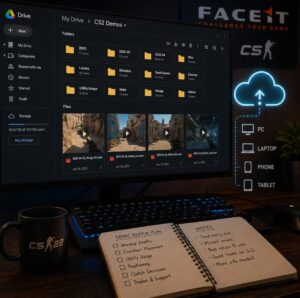
 If you’re serious about improving in CS2 and climbing FACEIT levels, demo review is one of the most effective habits. The problem isn’t just watching demos; it’s organizing them in a way that actually helps you learn. Many players download matches, watch them once, and never look at them again. In discussions around progression, topics like faceit boosting often come up, but regardless of approach, having a structured way to review your own gameplay remains essential. Cloud storage solves this by turning your demos into a structured library. Instead of scattered files on your desktop, you create a system that is accessible, organized, and built for long-term improvement.
Why Organization Matters for Improvement
Demo review only works when you can easily revisit your matches. Without structure, it becomes difficult to track patterns or compare your performance over time. You might remember a bad game, but you won’t remember the exact mistake or how often it happens.
When your demos are organized properly, you start to see connections. You can go back to specific matches, compare similar situations, and recognize habits that repeat across games. This is where real improvement begins. Cloud storage adds convenience on top of this. Your files are backed up, accessible from any device, and easy to share if you want feedback. It removes friction, which makes it more likely that you’ll actually review your games consistently.
Choosing the Right Cloud Storage Tool
You don’t need anything advanced to get started. Platforms like Google Drive, Dropbox, and OneDrive all work well for storing demo files. What matters is choosing something that fits your workflow and is easy to maintain.
Look for a tool that gives you enough storage for large files, allows simple folder organization, and syncs across devices. Sharing features are also useful if you plan to review games with teammates. Most free plans are enough at first, but as your demo library grows, you may need to upgrade to a paid plan to increase storage space.
Setting Up a Simple Folder Structure
The most important part of your system is how you organize your files. A simple structure works better than a complicated one that you won’t maintain. A clean setup could be based on time. For example, you can create folders by year and month, then store your demos in each month’s folder. This keeps everything chronological and easy to navigate.
You can also add a few extra layers depending on your needs:
- Separate folders for wins and losses
- Grouping by maps you frequently play
- Distinguishing between practice games and competitive matches
The goal is not to create the perfect system, but one that lets you find your demos quickly without thinking too much.
Naming Your Demo Files Properly
File naming is a small detail that makes a big difference over time. Default demo names are often unclear, making it harder to find specific matches later.
A simple naming format that includes the date, map, and result is enough. For example, a file named 2026-04-27_Mirage_Win is immediately understandable. You can scan your folder and know exactly what each file contains. Consistent naming helps you avoid opening multiple files just to find the one you need.
Adding Notes to Your Demos
Storing demos is useful, but adding notes makes them far more valuable. After reviewing a match, take a few minutes to write down key observations. This doesn’t need to be detailed or time-consuming. Short notes work best because they are easy to maintain. You might write something like:
- Died too early on the CT side
- Poor positioning when defending A site
- Good use of utility in mid control
These notes help you remember what happened in each match. Over time, they also reveal patterns that are hard to notice from memory alone. You can store notes as simple text files or use documents within your cloud platform. The important part is consistency, not the format.
Tagging and Categorizing Your Library
As your demo collection grows, it helps to group certain types of matches together. While cloud storage tools don’t always have advanced tagging, you can use folders or naming conventions to achieve the same effect.
For example, you might create categories for:
- Matches with frequent mistakes
- Strong performances worth reviewing
- Specific scenarios like clutch rounds
This allows you to quickly revisit the type of gameplay you want to improve. Instead of searching randomly, you go directly to relevant examples.
Building a Simple Review Routine
A well-organized system only works if you use it regularly. The goal is to make demo review a habit, not an occasional task. After each session, upload your demo to the cloud, review at least one match, and write a few notes. This process doesn’t take long, but it builds a valuable archive over time.
As you repeat this, your demo library becomes a record of your progress. You’re no longer relying on memory. You have actual data showing how your gameplay evolves.
Using Cloud Storage for Team Play
If you play with teammates, cloud storage becomes even more powerful. You can create shared folders where everyone uploads demos and notes. This makes it easier to review games together and discuss specific situations.
Instead of relying on memory during discussions, your team can reference actual gameplay. This leads to clearer communication and better coordination. Over time, it also helps build stronger team strategies.
Common Mistakes to Avoid
While setting up your system, keep things simple. Overcomplicating your folders or tracking too much information can make maintaining the process harder.
Common issues include:
- Creating too many folders that are difficult to navigate
- Uploading demos but never reviewing them
- Letting your library grow without consistent organization
The best system is one you can stick with. Even a basic setup can be effective if you use it regularly.
Final Thoughts
Cloud storage is more than just a place to keep files. When used properly, it becomes a tool for structured improvement. By organizing your demos, adding notes, and building a review routine, you turn your gameplay into a resource you can learn from.
Climbing FACEIT levels is not just about playing more matches. It’s about understanding your mistakes and improving over time. A well-managed demo library helps you do exactly that. Instead of letting your matches disappear after you play them, store, study, and revisit them. That’s how you turn every game into meaningful progress.