
Business Clouds
Business cloud storage is a secure, scalable way for companies to store, manage, and share data online. It allows teams to access files from anywhere,… Read More
The Cloud Where Your Files Live Smarter
Cloud Storage Advice is a blogging site that shares ideas related to Cloud Storage. https://cloudstorageadvice.com
Know More
Cloud storage is a type of data storage where your files are stored on remote servers accessed via the internet, instead of being saved on… Read More

RAM (Random Access Memory) What It Is: A type of temporary memory used by the computer to store data that is actively being used. It’s… Read More
Uses of Digital Data: Communication (emails, social media) Business operations (databases, analytics) Entertainment (music, movies) Education (e-books, online courses) Scientific research (data analysis, simulations) https://cloudstorageadvice.com
Business cloud storage is a secure, scalable way for companies to store, manage, and share data online. It allows teams to access files from anywhere,… Read More
Cloud storage lets you save data on remote servers accessed via the internet. When you upload a file, it’s encrypted, sent to a cloud provider’s… Read More

Cloud storage gives authorized users on-demand access to shared computing resources, as defined by the National Institute of Standards and Technology. For tire businesses operating across several locations or shifts, that shared access can keep label templates consistent while reducing reliance on files saved to individual computers.
A centralized workflow is especially useful when teams produce tire manufacturers and retailers stickers for shipping, inventory, or order processing. Without a controlled template library, employees may print outdated addresses, incorrect barcode fields, or layouts that do not match the label stock loaded into a printer.
Begin by identifying every template in active use. Record its purpose, dimensions, printer model, data source, barcode type, and responsible department. Include files stored on local computers, shared drives, design applications, and printing workstations.
This inventory establishes a baseline before anything moves to the cloud. NIST describes configuration management as controlling how systems and products are initialized, changed, and monitored throughout their life cycle. Applying that principle to label files helps teams distinguish approved templates from abandoned drafts and duplicates.
Select one cloud repository as the official source for production templates. It may be a managed document platform, an application-specific label system, or a version-controlled repository. The appropriate choice depends on file format, integration requirements, staff skills, security policies, and the number of facilities involved.
Create separate areas for development, testing, approved production files, and archived versions. Production operators should see clearly which templates are ready to print. Editing rights can be limited to designers, system administrators, or designated label coordinators, while operators receive read or print access.
Organize templates by function rather than by employee. A practical hierarchy might separate inbound inventory, warehouse identification, customer orders, carrier shipping, and returns. If facilities require different sender details or printer settings, create controlled location variants beneath the relevant category.
Use filenames that reveal the template’s purpose and status. Include elements such as label size, workflow, facility code, and revision number. Avoid names such as “final,” “latest,” or “new version,” because their meaning becomes unclear as files accumulate.
Keep fixed design elements within the master template and obtain changing information from a controlled business system whenever the software supports that arrangement. Variable fields may include stock numbers, order identifiers, destinations, service levels, and barcode values.
Define each field’s source and acceptable format. This prevents one facility from using a product number where another uses an internal order reference. It also makes troubleshooting easier because teams can determine whether an error came from the template, source data, or printer configuration.
Print a sample on the same label material and printer type used in production. Check dimensions, margins, orientation, field lengths, readable text, barcode placement, and scanning performance. Test with short and long data values so unexpectedly large entries do not overlap other elements.
The GS1 organization advises barcode users to consider symbol size, placement, printing method, color, and print quality. Where GS1 symbols are used, verification should follow the applicable specification rather than relying solely on a successful scan from one handheld device.
Once testing and review are complete, move the template into the approved production area. Record the revision number, approval date, owner, affected locations, and a short description of the change. Notify each shift or facility when an update affects its work.
Configure printing stations to retrieve approved files from the cloud repository or synchronize controlled local copies. Broader guidance on secure cloud storage practices also highlights the value of access controls, organized folders, and carefully managed offline files. If internet access is interrupted, define whether operators may use a cached template and how the system will confirm that it is still current. Test synchronization at every site instead of assuming one successful installation represents the entire network.
Require a change request for modifications to dimensions, fields, barcodes, carrier information, or printer settings. The request should explain the problem, identify affected workflows, and name the person responsible for testing. A second reviewer can compare the proposed output with the currently approved version.
GitHub documentation explains that version-control systems preserve change history and allow earlier versions to be recovered. Even when templates are managed outside software development, the same discipline is valuable. Teams should retain revision history, identify who made each change, and document why it was necessary.
Schedule periodic reviews to remove obsolete files from production access, confirm user permissions, and test common label formats. Protect the approved area from unreviewed overwrites. GitHub uses protected branches to require reviews or status checks before changes are merged, a model that larger labeling operations can adapt to their approval process.
A cloud workflow is most useful when it combines convenient access with clear ownership. Central storage alone does not guarantee consistency. Documented naming rules, controlled permissions, realistic print tests, revision records, and planned synchronization create the dependable process tire manufacturers and retailers need as label volumes, facilities, and shifts increase.
Gartner has repeatedly noted that enterprise technology projects often struggle because of planning gaps, data complexity, and integration challenges rather than software alone. SAP migration projects illustrate this pattern clearly. Discussions around these projects often focus on system features, deployment schedules, and user training. Yet many migration problems begin much earlier, hidden beneath the surface in storage infrastructure and data management decisions.
Despite the attention given to software implementation, many organizations discover that cloud storage creates unexpected pressure points during migration efforts. Industry perspectives from a top SAP partner highlight how migration planning increasingly involves broader infrastructure concerns rather than software deployment alone. The discussion has gradually shifted from moving applications to understanding how data is organized, transferred, stored, and maintained across environments.

Businesses usually enter migration projects with understandable priorities. Teams discuss project budgets, implementation timelines, workflow design, and employee training plans. These areas receive immediate attention because they are visible and directly tied to business operations.
Storage architecture rarely receives the same level of attention during early discussions. The issue often appears technical and distant from day-to-day business decisions. However, storage systems affect nearly every aspect of migration activity.
Large organizations collect data for years. Customer records, invoices, archived documents, employee files, and operational logs continue to grow over time. By the time migration begins, businesses may be handling millions of files spread across different systems and locations.
These hidden layers create a challenge. The migration itself may proceed exactly as planned, while the data supporting the system introduces unexpected obstacles.
Older systems frequently accumulate information without a consistent strategy. Duplicate records appear over time. File naming conventions change between departments. Some data remains untouched for years while still consuming storage resources.
Research from IBM suggests that poor data quality creates measurable operational costs for organizations. During migration projects, this issue becomes even more visible because businesses suddenly examine information that has quietly accumulated for years.
Imagine transferring thousands of customer files into a new environment only to discover conflicting records or missing information. The software itself may function perfectly, yet data inconsistencies create delays.
Migration teams frequently estimate active database sizes while overlooking supporting files, archives, attachments, and historical records. Small miscalculations can become significant once migration starts.
International Data Corporation (IDC) projects continuous growth in global enterprise data volumes as organizations expand digital operations. Data growth rarely follows a straight line. Businesses generate reports, communication records, multimedia content, and customer interactions every day.
As a result, migration schedules built around initial estimates can quickly become unrealistic.
Storage concerns extend beyond capacity. Access management creates another challenge that organizations frequently underestimate.
Different departments require different levels of access. Finance teams handle sensitive records. Human resources departments manage employee information. Operations teams may require broader visibility.
When organizations combine older systems with cloud-based environments, permission structures sometimes overlap or conflict. These issues can create security risks or disrupt employee workflows after migration.
The National Institute of Standards and Technology (NIST) emphasizes the importance of carefully managing access controls within cloud environments because data security depends heavily on permission structures.
Many organizations do not completely replace old systems during migration. Instead, they operate in hybrid environments where some data remains on internal systems while other information moves to cloud platforms.
This arrangement offers flexibility, although it introduces additional coordination challenges.
Data synchronization becomes more difficult. Information may update in one system while remaining unchanged elsewhere. Teams can unknowingly work with outdated records, creating confusion and inefficiencies.
These challenges underscore a larger reality. Migration projects increasingly involve balancing multiple environments rather than performing a simple transfer from one location to another.
Organizations involved in large implementation projects often observe similar patterns after reviewing unsuccessful migrations.
One recurring lesson involves preparation. Businesses sometimes focus heavily on deploying software while treating storage planning as a secondary task. Yet infrastructure decisions shape long-term performance and operational stability.
Experienced ERP implementation specialists frequently emphasize early data assessments before migration begins. Understanding where information exists, how much inactive data remains, and how files interact with business processes reduces uncertainty later.
Backup planning also plays an important role. Data loss events remain uncommon, although risk still exists during complex migrations. Businesses increasingly develop layered backup strategies to protect information throughout transition periods.
Cloud consultants and enterprise integration teams have also learned that scalability deserves attention from the beginning. Storage requirements rarely stay static after implementation ends. Systems continue evolving as businesses grow.
Storage discussions often focus on space alone. Capacity matters, but other factors carry equal importance.
Performance affects daily operations. Slow access to records can reduce productivity across departments. Delays measured in seconds may seem small individually, yet repeated interruptions create larger operational consequences.
Collaboration also depends heavily on data accessibility. Modern work environments frequently involve distributed teams operating across locations and time zones. Employees expect fast and reliable access to information regardless of physical location. Discussions around business cloud storage environments increasingly focus on balancing accessibility, security, and long-term scalability as organizations expand their digital operations.
Business continuity introduces another consideration. McKinsey & Company has discussed how resilient digital systems increasingly influence organizational stability and long-term adaptability. Storage systems support recovery efforts during disruptions and help maintain operational continuity.
For this reason, migration planning extends beyond technical deployment activities. Storage infrastructure influences how people work long after implementation teams leave.
Many SAP migration conversations begin with software and end with implementation timelines. However, failed projects often reveal a different story. Hidden infrastructure challenges, data complexity, and storage planning gaps frequently shape outcomes more than expected.
Enterprise solution providers, ERP specialists, and implementation teams increasingly recognize that successful migrations depend on understanding the systems supporting business data. Software remains essential, yet information must move efficiently, remain accessible, and scale with changing business needs.
As organizations continue expanding cloud operations, storage decisions may become less of a background technical discussion and more of a strategic business consideration. The lessons emerging from migration experiences suggest that success often depends on what businesses prepare before systems ever go live.

According to a report by Statista, over 60 percent of internet users consult forums and online communities before trying a new tech service. That makes sense when you think about it. We trust crowdsourced wisdom because it feels honest. Especially when our precious files, family photos, tax returns, and project work are involved.
Launching a cloud storage platform is easy compared to convincing users to trust it with their data. It’s sort of like building a house versus convincing someone it won’t fall down in a storm; the first is nuts and bolts, the second is a lifetime of proof. That’s why some startups are teaming up with a Reddit account provider to join conversations and show they actually know what they’re talking about.
The goal isn’t marketing noise, but human connection; the kind that comes from answering real questions and showing real expertise. Businesses learning from these community-driven insights can see which providers earn trust and adoption, as discussed in how companies analyze Reddit-driven feedback when choosing cloud storage providers.
Trust is the most important currency in cloud storage services. Users want proof that their files will remain safe, private, and accessible. They want to hear about encryption in plain English, system redundancies without jargon, and backup assurances without sales slogans. That’s a tall order for any young company, and it’s one reason why Reddit, with its deep and engaged tech communities, has become a battleground for credibility.
Reddit isn’t a place for polished press releases. It’s where developers debate the merits of End-to-End encryption in r/privacy, where sysadmins share horror stories in r/sysadmin, and where curious folks ask, “Hey, is this startup for real?” That’s a goldmine for cloud brands if they behave like helpful humans rather than bots spitting out promo copy. But there’s a catch: Redditors can smell insincerity from a mile away.
Cloud storage isn’t a casual purchase. People don’t buy it on a whim at the grocery store checkout. They research. They compare. They read user experiences and horror stories about lost files. Trust has to be earned, not advertised. Gartner, a respected research firm, has highlighted that buyers of enterprise tech give enormous weight to community feedback before signing contracts or paying for subscriptions.
That’s where conversations matter. A user wondering whether a startup’s data center is reliable might find a post on Reddit discussing uptime, encryption, or pricing quirks. If that conversation includes thoughtful answers from a real representative, someone with a history of quality engagement, it’s more convincing than a banner ad with a flashy discount offer.
On Reddit, people share unfiltered opinions. They share frustrations. They share wins. And yes, sometimes they share memes about servers going down on a Monday morning. That’s part of the charm. But it also means that cloud services can’t just show up with slick slogans. They need to answer hard questions, like “How do you protect against ransomware?” or “What happens if a data center loses power?” The more transparent and human the response, the better.
Community conversations help explain complex technical concepts. Instead of reading abstract white papers, users see real dialogue: pros and cons, comparisons with competitors, and honest clarifications. That’s the kind of context that helps a cautious CTO pick a service. And that kind of context doesn’t come from ads. It comes from engagement.
Registered profiles that already have credibility (commenters with history, points, and a track record) add weight to answers. That’s why some startups look for established accounts capable of contributing meaningfully. It’s not a trick to game the system. It’s a way to enter a community as a known participant rather than an anonymous salesperson. Reddit users are, after all, quick to call out sockpuppet accounts and marketers hiding behind fake handles.
Take one cloud startup founder I spoke with recently. They confessed that during their early launch, they were terrified of trolls accusing them of exaggerating security claims. Instead of avoiding Reddit, they jumped in with honesty. They answered questions at 2 a.m. They shared screenshots of technical tests. And they even admitted when they didn’t have an answer. It was messy at times, but it worked.
Another company shared that a single thoughtful Reddit comment explaining their approach to zero-knowledge encryption led to a flurry of signups that quarter. They didn’t push links. They didn’t spam subreddits. They simply explained, in normal language, what they offered and why it mattered. That’s a hit of legitimacy you can’t buy with a $10,000 ad campaign.
So what’s the takeaway? Engagement beats broadcast every time. When cloud startups join genuine community conversations, they get real feedback. They show empathy. They build authority. And little by little, they chip away at skepticism.
Yes, participating in Reddit takes time. There are no shortcuts. But genuine involvement can be a shortcut to trust. When users see thoughtful responses coming from credible accounts, they’re more likely to believe a startup is trustworthy and worth trying. That’s why the role of an established profile, backed by careful messaging, is becoming part of savvy marketing strategies.
At the end of the day, trust is earned in conversations, not ads. For cloud storage startups fighting for attention in a crowded market, thoughtful Reddit engagement is one of the better tools they have. It’s not shiny. It’s not instant. But it’s honest. And in a space where honesty protects your data, that’s gold.
Working with a reliable account and fostering real engagement can make all the difference. It’s about human connection in a digital world where people fear losing memories or mission-critical files. And that’s why many startups are choosing this route as they build their reputation and customer base in tech-savvy corners of the internet.
Businesses today rely heavily on cloud storage to keep their data secure, accessible, and organized. For companies exploring the advantages of modern storage solutions, understanding the main benefits of using storage devices can help them compare traditional and cloud-based options. With so many cloud providers available, it can be tempting to look for the cheapest deals. However, just like companies that boost their online visibility using Redaccs Services for very cheap upvotes, choosing the cheapest option doesn’t always lead to the best outcome.
Before selecting any cloud storage provider, it’s important for businesses to understand how low-cost services can create hidden risks. Cheap plans may look attractive upfront, but they often come with compromises that affect security, stability, and long-term reliability.
When businesses choose cloud storage providers solely based on low cost, they may encounter several issues:
Similarly, using very cheap upvotes through Redaccs Services may temporarily boost online engagement, but it can also bring long-term consequences, such as low-quality traffic or penalties from social platforms.

Whether you are selecting a cloud storage provider or considering services like Redaccs, evaluating quality versus cost is essential. For cloud storage, businesses should consider:
For online engagement services like Redaccs, businesses should consider credibility, risk of penalties, and long-term sustainability of results.
The key takeaway for businesses is to balance affordability with trustworthiness. A low price may seem attractive, but the hidden risks often outweigh the benefits. In both cloud storage and social media marketing, investing in reliable services ensures smoother operations and better long-term outcomes.
Businesses that understand the risks of very cheap solutions, whether in cloud storage or online engagement, are better equipped to make informed decisions. Choosing a cloud storage provider should be guided by reliability, security, and quality, just as decisions regarding services like Redaccs require careful consideration. Ultimately, thoughtful evaluation helps prevent costly mistakes and protects both data and reputation.
 Cloud storage has become an essential part of modern life. It allows people and businesses to store their files, photos, and data securely online instead of relying on physical hard drives. Platforms like Google Drive, Dropbox, and iCloud are among the most popular options. They make it easy to access your files anywhere, anytime, from any device with an internet connection.
The idea behind cloud storage is simple: instead of keeping your data on your personal computer or phone, it’s saved on remote servers owned by cloud providers. These servers are managed and protected with advanced technology, keeping your information safe from hardware damage or accidental loss.
Cloud storage is not just about convenience, it’s also about protection and used to repair your online reputation. Losing data from a broken laptop or stolen phone can be devastating. With cloud storage, those risks are minimized. Everything you store can be recovered, even if your device fails.
Your online reputation is how people perceive you or your brand based on what they see online. Whether you are an individual professional, a small business owner, or a large company, your digital footprint influences trust and credibility. Potential employers, clients, or partners often look you up before doing business. What they find can make or break opportunities.
A few negative comments, false reviews, or misleading articles can easily affect your image. The internet never forgets, and once something harmful appears online, it can spread quickly. Repairing your reputation takes time, but it’s possible with the right strategies and tools.
That’s where cloud storage comes in, it helps you control your digital presence more effectively by giving you a reliable way to organize, update, and share your best content.
Repairing your online reputation often involves managing information—what stays, what goes, and what’s shared. Cloud storage plays a key role in that process. Here’s how:
When you’re trying to improve your online image, you need to highlight your best achievements, testimonials, and success stories. Cloud storage allows you to save all these materials in one secure place. From there, you can easily upload or share them across your website, social media, or media platforms.
Having updated brand materials, such as logos, media kits, and professional photos, makes your online presence more consistent. Cloud platforms let you organize these assets and make them accessible to your team or marketing agency. That consistency strengthens trust and gives people a positive impression of your brand.
If your website or online account is hacked, or if negative content appears, it’s vital to respond fast. With cloud storage, you always have a backup of your original files, posts, and brand materials. This ensures that you can quickly rebuild your digital presence and continue presenting accurate, professional content online.
Fixing your online reputation is often a team effort involving PR specialists, writers, and designers. Cloud storage makes collaboration easy. You can share documents securely, review updates in real time, and ensure everyone works with the latest version of a file.
Sometimes, reputation issues arise from misunderstandings or misinformation. Having clear documentation—such as contracts, communications, and reports—stored safely in the cloud helps you prove your side when needed. It adds credibility and transparency to your professional dealings.
Repairing your online reputation is not an overnight process, but with the right steps and cloud-based tools, it becomes manageable.
Step 1: Audit your online presence
Start by searching your name or business online. Identify the negative content and the platforms where it appears. Create a simple list in your cloud storage that tracks these results. This makes it easier to monitor changes over time and plan your next actions.
Step 2: Build and promote positive content
You can’t always delete what’s already online, but you can push it down in search results by publishing positive content. Use your cloud storage to organize blogs, articles, videos, and testimonials that reflect your best work. Share them consistently to show your credibility and professionalism.
Step 3: Monitor and respond professionally
If people post negative feedback or false claims, address them respectfully and with facts. Avoid emotional reactions. Save screenshots and documentation in your cloud folder so you have records of what was said and how you responded.
Step 4: Keep your profiles updated
Outdated profiles can give the impression that you are inactive or unreliable. Use your cloud storage to keep all your professional materials updated like resumes, certificates, portfolio samples, and more. Upload fresh versions to your websites and social accounts regularly.
Step 5: Partner with reputation management professionals
Sometimes, you need expert help. Many reputation management services use cloud-based tools for content creation, SEO optimization, and brand monitoring. By giving them secure access to your stored materials, you make the process faster and more efficient.
When using cloud storage for sensitive documents or personal files, security should always be a priority. Choose providers with strong encryption, two-factor authentication, and clear privacy policies.
Also, manage your sharing permissions carefully. Not every file should be public or shared with multiple users. Review your folders regularly to ensure that only the right people have access.
Cloud storage providers like Google Drive, Microsoft OneDrive, and Dropbox continuously improve their security systems, but user responsibility still matters. Use strong passwords and enable alerts for unusual activities. Protecting your data is part of protecting your reputation.
Visa delays worldwide are mostly linked to missing, damaged, or inaccessible supporting documents. As travel rules tighten and embassies move online, the way travelers store hotel bookings, flight records, and identity files has become a core part of successful visa planning.
Travel documents now live across emails, apps, and booking platforms, which increases the risk of loss. A single misplaced file can delay an application or trigger extra screening. This is why travelers rely on centralized cloud storage to manage everything from passport scans to a legit dummy ticket, keeping documents accessible, verifiable, and ready when officials ask for proof.

Visa applications often require fast responses. Consulates may request updated hotel confirmations, onward travel proof, or revised itineraries with little notice. Understanding how cloud storage works helps explain why it removes friction by keeping documents synced and searchable across devices. A traveler can retrieve a booking confirmation from a phone while standing in line or forward a secure link to an agent within seconds.
Unlike local storage, cloud platforms reduce dependence on a single device. Lost phones and broken laptops no longer mean lost paperwork. Files remain available, versioned, and backed up, which adds confidence during high pressure visa processes.
Security starts with encryption. Strong cloud providers encrypt files during upload, storage, and access. This prevents third parties from reading sensitive travel data, even if servers are compromised. Look for platforms that use industry standards like AES 256-bit encryption and TLS for data transfer.
Access control is just as important. Password protection alone is weak. Multi-factor authentication adds a second verification step, often through a mobile app or biometric check. Some services also allow time-limited access links, which are useful when sharing documents with agencies or embassy portals.
Clear structure saves time. Create folders by country, trip, or visa type. Inside each folder, separate identity documents, bookings, and supporting letters. Consistent file names reduce confusion, especially when multiple versions exist.
Many cloud tools support document scanning with automatic edge detection and text recognition. This turns paper confirmations into searchable PDFs. When officials ask for proof of accommodation or onward travel, the right file can be found in seconds.
Modern travelers switch between phones, tablets, and laptops constantly. Cloud syncing ensures every update appears everywhere. Still, syncing should be selective. Sensitive folders can be restricted to specific devices to reduce exposure if a phone is lost.
Offline access is another key feature. Some platforms allow files to be saved locally in encrypted form. This is useful at airports or consulates with weak connectivity. Once back online, changes sync automatically.
Visa documents often contain personal data protected by privacy laws. Reputable cloud providers comply with regulations such as GDPR and regional data protection rules. They publish clear policies on data handling, storage location, and user rights.
Travelers should review where servers are located and how long files are retained. Automatic deletion schedules reduce long-term risk. This matters when storing temporary documents like hotel reservations or a legit dummy ticket used only for visa verification.
The best option depends on travel frequency and document volume. Casual travelers may rely on general cloud drives with strong security settings. Frequent travelers and visa applicants benefit from services that integrate document verification, booking storage, and export-ready formats.
Ease of use matters. A clean interface reduces mistakes. Sharing should be intuitive, with clear controls and audit logs. Support availability is another factor when deadlines are tight.
Secure cloud storage removes stress from visa preparation. Documents stay organized, protected, and ready for inspection. Whether managing passport copies, hotel confirmations, or a legit dummy ticket, a structured cloud approach ensures nothing critical is left behind when it matters most.
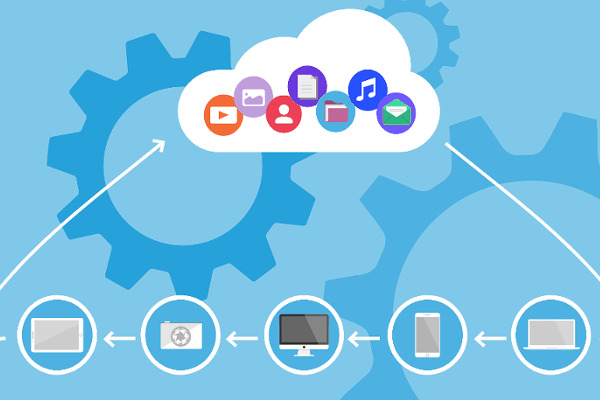
Cloud storage is a type of data storage where your files are stored on remote servers accessed via the internet, instead of being saved on your local device (like a hard drive or USB stick).
How It Works:
You upload files (like photos, videos, or documents) to a cloud provider using an app or website.
The files are stored on powerful data center servers.
You can access those files anytime, anywhere, using any device connected to the internet.
https://cloudstorageadvice.com
RAM (Random Access Memory)
What It Is:
A type of temporary memory used by the computer to store data that is actively being used.
It’s volatile, meaning it loses all data when the computer is turned off.
SSD (Solid State Drive)
What It Is:
A storage device that holds your data permanently, even when the computer is turned off.
It replaces older Hard Disk Drives (HDDs) and is much faster.
Uses of Digital Data:
Communication (emails, social media)
Business operations (databases, analytics)
Entertainment (music, movies)
Education (e-books, online courses)
Scientific research (data analysis, simulations)
Characteristics of Digital Data:
Binary Format: All digital data is ultimately made up of bits (0 and 1).
Easily Processed: Computers can store, modify, and transmit digital data quickly and accurately.
Flexible: Can represent many types of information like text, images, audio, and video.
Types of Digital Data
Text Data
Numeric Data
Audio Data
Image Data
Video Data
Software/Data Files
https://cloudstorageadvice.com
Here are the main benefits of using storage devices:
Data Storage and Retention
Data Portability
Data Backup
Improved System Performance
Cost-Effective Solutions
Security and Privacy
Scalability
Remote Access: Data can be accessed from any device, anywhere.
Scalability: Storage capacity can easily be increased or decreased.
Data Backup & Recovery: Often includes built-in backup and recovery features.
Security: Providers use encryption, access control, and other measures to protect data.
Cost-Effective: Pay-as-you-go pricing models reduce the need for expensive hardware.
 If you’re serious about improving in CS2 and climbing FACEIT levels, demo review is one of the most effective habits. The problem isn’t just watching demos; it’s organizing them in a way that actually helps you learn. Many players download matches, watch them once, and never look at them again. In discussions around progression, topics like faceit boosting often come up, but regardless of approach, having a structured way to review your own gameplay remains essential. Cloud storage solves this by turning your demos into a structured library. Instead of scattered files on your desktop, you create a system that is accessible, organized, and built for long-term improvement.